


Governance, privacy and cost
Each person sees only the rows and columns they should
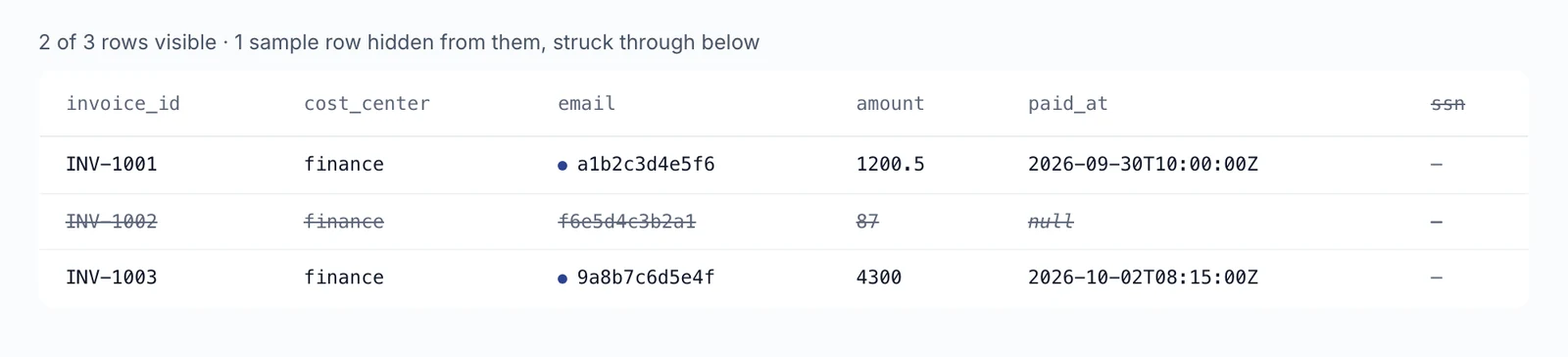
One rule on a table filters rows and masks columns by who is asking, everywhere that table is used. Every filtered answer says it was filtered.

- One rule per table
- Applies everywhere
- Trust in the numbers
What you get
One rule per table
An admin attaches a single rule that filters rows and masks columns based on the person asking.
Applies everywhere
The rule covers queries, previews, snapshots, schema and connected AI tools, so the same limits hold across them.
Trust in the numbers
Every filtered answer says it was filtered, so no one mistakes a partial view for the full total.
How it works
An admin turns on row and column policies.
The admin attaches one rule to a table kept on the server.
Each query, preview or AI tool request is filtered by who is asking.
Filtered answers say that they were filtered.
Whoever is asking
- Queries
- Previews
- Snapshots
- Schema
- Connected AI tools
Table kept on the server
One SQL rule attached by an admin
- Filters rows
- Masks columns

Filtered answer
Says it was filtered
- An admin turns on row and column policies
- An admin attaches one SQL rule to a table kept on the server.
- The rule filters rows and masks columns by who is asking.
- It applies to queries, previews, snapshots, schema and connected AI tools.
- Every filtered answer says it was filtered.
Good to know
Built for
- CFOs protecting sensitive figures
- IT admins enforcing data access
- Data team leads sharing tables widely
Before you start
- An admin switches this on.
- Rules apply to tables kept on the server.
More in Governance, privacy and cost
- NewGovernance, privacy and cost
See AI spending by person, agent and task
Agnes records each AI call it makes, from chat to document processing, with its price where one is known. Admin dashboards show cost by task, agent, person and model. Since 18 Sep the owner of a conversation can see roughly what it cost.
Read more → - Privacy for shared agent runsWhen you use a shared agent, you now only see the prompt, summary, errors, and usage for the runs you started yourself. For runs started by other people, you will only see the status and timestamps.
- An admin's chat agent no longer acts with admin rightsCommands and tools an agent runs in an admin's chat now carry no admin authority, so it cannot act on other people's data apps or reports on the admin's behalf. Admin lists stay readable from chat; administrative work belongs in the web admin pages or a terminal outside the chat.

See it live
See it on your own data
Book a short walkthrough and we will show you how this works with your own company data.