


Daily update
Background tasks for agents and page links
You can now have an agent run tasks in the background while you chat and see which pages link to your documents. Administrators can also enable Microsoft Teams integration and a central space for company knowledge.

230
changes in the day's release notes
25 written up here for people who use Agnes
- 25New
- Chat with Agnes
- Metrics and business definitions
- Company knowledge
- Agents that work for you
- Publish and collaborate
- Connect your own tools
Start here
Brain for company knowledge
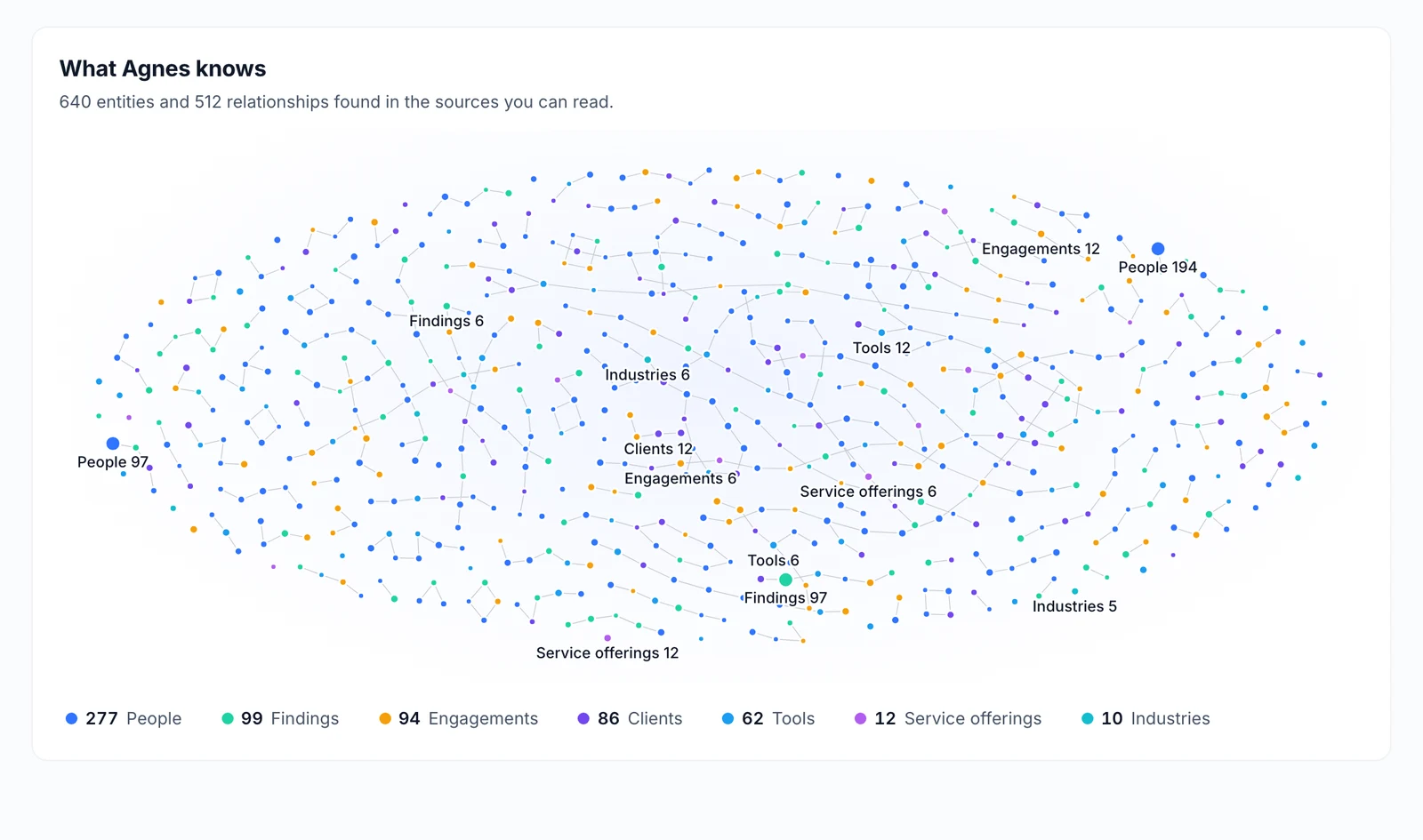
A central place called Brain replaces the separate library and decision menus to house everything Agnes knows. It organizes topics, definitions, decisions, documents, and data packages in one unified space, complete with a visual map and a dedicated section for items that need your review.
Why it matters: You can find, manage, and review all your company knowledge in a single organized location.
Company knowledgeAsk an agent to build an agent
You can now ask an agent to create a brand new agent for you directly in a chat. The new agent is ready immediately, owned by you, and automatically set up based on your request.
Why it matters: This saves you the effort of manually configuring a new agent from scratch.
Agents that work for you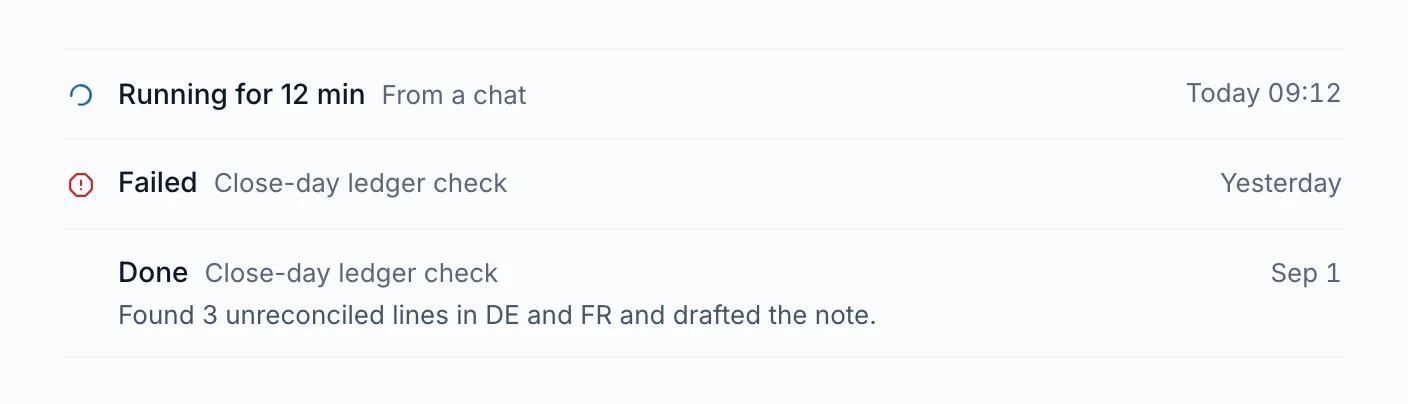
Background tasks for agents
You can now create an agent from a conversation and have it run tasks in the background while you continue chatting. You will receive updates on its progress and can stop individual tasks at any time.
Why it matters: You can keep working on other things while your agent handles time-consuming tasks.
Agents that work for you
Chat with Agnes
4 updatesSource links in answer bullets
When an answer bullet relies on a single source, it now includes a link to that source. Clicking the link opens the source document right next to your conversation.
Why it matters: You can quickly check the exact document a specific point came from without losing your place in the chat.
Rich replies in Slack
Agnes can now format its Slack replies with headings, labeled fields, tables, and text charts. The response appears gradually as it is being written, and suggested next steps are displayed as clickable buttons.
Why it matters: This makes it easier to read complex answers and quickly take the next step directly within Slack.
Feedback on unhelpful answers
Giving a thumbs-down to an answer now opens a card where you can select reasons like wrong data or a misread question, and add a comment. You can choose to just send the feedback or ask the agent to try answering again.
Why it matters: Providing specific feedback helps improve future answers and gives the agent a chance to correct its mistake immediately.
Fewer and clearer clarifying questions
The chat agent now asks clarifying questions only when necessary, otherwise stating its assumptions. When it does ask, it offers up to three clear options and keeps any proposed plans to five steps with a time estimate.
Why it matters: You spend less time answering unnecessary questions and can make decisions faster from well-organized options.
Metrics and business definitions
2 updatesReview for agreed definitions
When the assistant learns something that changes an agreed metric or glossary term, it will wait for a person to review it. The suggested change is sent directly to the owner of that metric instead of being automatically approved for everyone.
Why it matters: This prevents accidental changes to your official company definitions.
Live metrics on the home screen
You can now add semantic-layer metrics directly to your home screen. Pinned metrics display as a live number, while per-period metrics show the latest period alongside a trend line and recent changes.
Why it matters: This keeps your most important business numbers visible at a glance.
Company knowledge
4 updatesSeparate knowledge for groups
You can set up specific groups to keep their own separate knowledge. When a member of one of these groups teaches the assistant something new, that information is only shared within their group unless someone manually shares it with the rest of the organization.
Why it matters: Different teams or legal entities can maintain their own private information without mixing it up.
Read scanned PDFs in collections
When you upload a PDF that only contains scanned images to a collection, the system can now read and transcribe the text. If the transcription fails, the file is marked for review with an explanation.
Why it matters: You can now search and extract information from scanned documents just like regular text files.
Table and metric dependencies
Agnes automatically maps out which artifacts use a specific table or metric, and which tables are used to compute a metric. You can ask Agnes to show you what depends on these items.
Why it matters: It makes it easier to understand how your data is connected and what might be affected if a table changes.
Page links and backlinks
You can now see which pages link to a specific artifact page and which pages it links out to. Agnes can also use this information to understand how your documents connect.
Why it matters: This helps you navigate related documents and understand how your information is connected.
Agents that work for you
2 updatesConfigure agents directly in chat
When you create an agent, it now asks you what it should do and what needs your approval. You can also ask in the chat to change an existing agent's name, instructions, tone, or allowed actions, and the updates happen immediately.
Why it matters: You can set up and adjust your agents naturally through conversation instead of navigating menus.
Agents handing work to agents
An agent can now pass tasks along to other agents you have access to. After you approve the connection the first time, the agents work together in a chain that you can monitor or stop from a single progress line.
Why it matters: This lets you combine specialized agents to complete complex processes automatically.
Publish and collaborate
8 updatesCollaborative sessions with shared data
You can now turn a conversation into a collaborative session and invite others to join. Invited members can bring their own data, tools, and skills into the shared space, setting specific rules on how their resources are used.
Why it matters: Teams can work together in a single chat using everyone's combined data and tools while keeping control over their own resources.
Read shared personal notes
You can now search and read notes that colleagues have shared with you from their personal repositories. You can access these shared notes directly in your private chats, and the original owner can see when their notes are read or found in a search.
Why it matters: This allows teams to securely share personal insights and reference material with specific colleagues.
Read time and scroll depth
When you share an artifact using a public link, you can now see how long people spend reading it and how far down the page they scroll. This information appears in the visits list alongside the source link they used.
Why it matters: This helps you understand if people are actually reading the content you share with them.
Nest pages within artifacts
Editors can now organize artifact pages into a hierarchy by moving a page under another page. You can create new child pages or move existing ones back to the top level.
Why it matters: This helps you structure large documents and keep related information grouped together.
Drag and drop media files
You can now paste or drop images, videos, and audio files directly into the web editor for saved documents. Images appear as previews in the editor, while video and audio files are added as links.
Why it matters: Adding media to your documents is much faster and does not require a separate upload step.
Math formulas in the editor
The artifact editor now supports math formulas. You can insert them from the menu or type them directly, and they will appear as properly formatted math.
Why it matters: You can easily write mathematical equations in your documents.
Export artifacts as a ZIP archive
Editors and admins can now download an entire artifact as a single ZIP archive. The export includes all versions, pages, comments, form responses, and settings, but excludes sensitive details like passwords and sharing links.
Why it matters: You can easily back up or move complete artifacts with all their history and discussions intact.
Import artifacts from a file
Bring an exported artifact back into the system from a file. The imported artifact includes its full history, pages, comments, replies, and decisions, with original authors and dates noted.
Why it matters: This makes it easy to move or restore complete artifacts without losing their context and history.
Connect your own tools
2 updatesRich answers in Microsoft Teams
Answers sent to Microsoft Teams now include formatted tables, images of charts, and buttons for suggested follow-up questions. You can also click a button to open the full conversation in the web chat.
Why it matters: Information is easier to read and interact with directly inside your chat application.
Microsoft Teams integration
You can now chat directly with Agnes in a private Microsoft Teams message. Agnes respects your existing data access rules, and will send a link to the web chat if a tool requires approval.
Why it matters: You can get answers and work with your data without leaving your main communication tool.
For administrators
2 changesWaiting on reporter status
Responders and administrators can now mark an issue report as waiting on the person who reported it. The reporter receives a notification, and replying to the issue will automatically reopen it.
Why it matters: This helps keep track of which issues need more information before they can be resolved.
Search artifacts by meaning
Artifact searches can now understand the meaning of your query to find the most relevant results. The search ranks artifacts and their pages based on meaning and highlights the specific section that matches best.
Why it matters: You can find relevant information based on concepts rather than having to type the exact keywords.
See it live
See it on your own data
Book a short walkthrough and we will show you how this works with your own company data.