


Agents that work for you
Have agents handle recurring work on a schedule
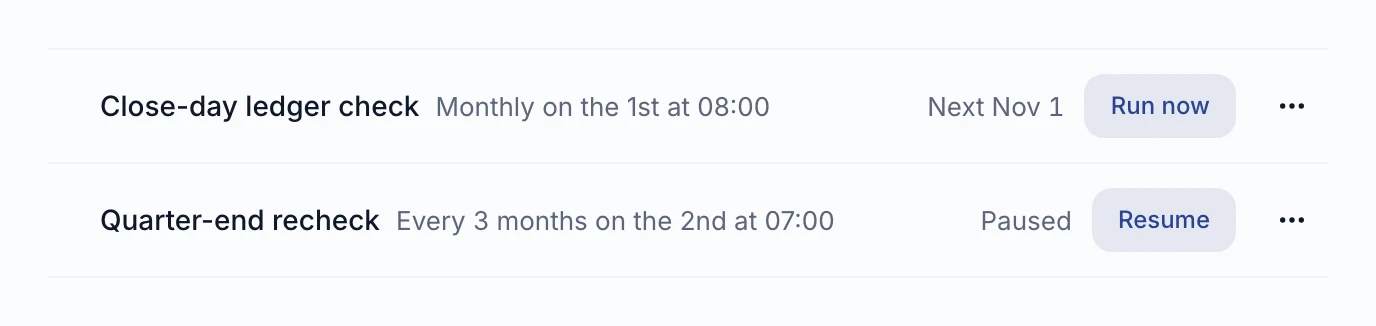
Give an agent up to 20 schedules, from every few minutes to set times each day, and manage them with simple on/off switches.

- Work runs on time
- Timing that fits
- Easy to oversee
What you get
Work runs on time
An agent can hold up to 20 schedules, so routine jobs run without anyone starting them.
Timing that fits
Run every few minutes or hours, daily at set times, or on a custom timing rule.
Easy to oversee
Since 19 August the builder's Schedules section shows on/off switches and the last run, and can start from a skill.
How it works
You open the Schedules section in the agent builder.
You add a schedule, optionally starting from a skill.
You choose the timing and switch it on.
You check the last run to see that it went.
Schedule
- Every few minutes or hours
- Daily at set times
- Cron expression

Agnes agent
- Up to 20 schedules per agent
- From 19 Aug: Schedules section with on/off switches and last run
- A schedule runs every few minutes or hours, daily at set times, or on a cron expression.
- It runs the agent. An agent can hold up to 20 schedules.
- From 19 August the agent builder has a Schedules section with on/off switches, last run and an option to start from a skill.
Good to know
Built for
- Finance leads with recurring reports
- Ops leads running routine checks
- Agent owners automating regular jobs
Before you start
- Each agent can hold up to 20 schedules.
More in Agents that work for you
 NewAgents that work for you
Call an agent by voice, in the browser or by phone
Talk to an agent out loud with Call on its card or by dialling a number. It answers in Czech or English, says it is an AI, and the transcript lands privately in your chat list. One switchboard number reaches every agent by extension, and an owner can require a personal phone PIN.
Read more →- NewAgents that work for you
Start an agent from another system with a signed webhook
An agent's owner creates a trigger and points a system such as GitHub or Linear at it. A signed delivery that matches the event filter starts one unattended run; duplicates and deliveries over the hourly limit do not. Since 8 Oct a trigger can also require conditions on the delivery's content.
Read more → - NewAgents that work for you
Build an agent by describing it
The agent builder is a conversation: describe the job and it fills in role, instructions and data, and nothing is saved until you press Save. Since 23 Sep the builder first looks through your catalog and company knowledge before it proposes a setup.
Read more →

See it live
See it on your own data
Book a short walkthrough and we will show you how this works with your own company data.